Overview
EduTeam provides a number of reporting tools that help you analyse activity levels, timesheet data, consultant performance, and client engagement. Reports can be used to identify trends, monitor productivity, understand where revenue is being generated, and support day-to-day operational decision making.
Reporting tables
Navigate to Reports > Tables
The reporting tables provide summary information for Activities and Timesheets.
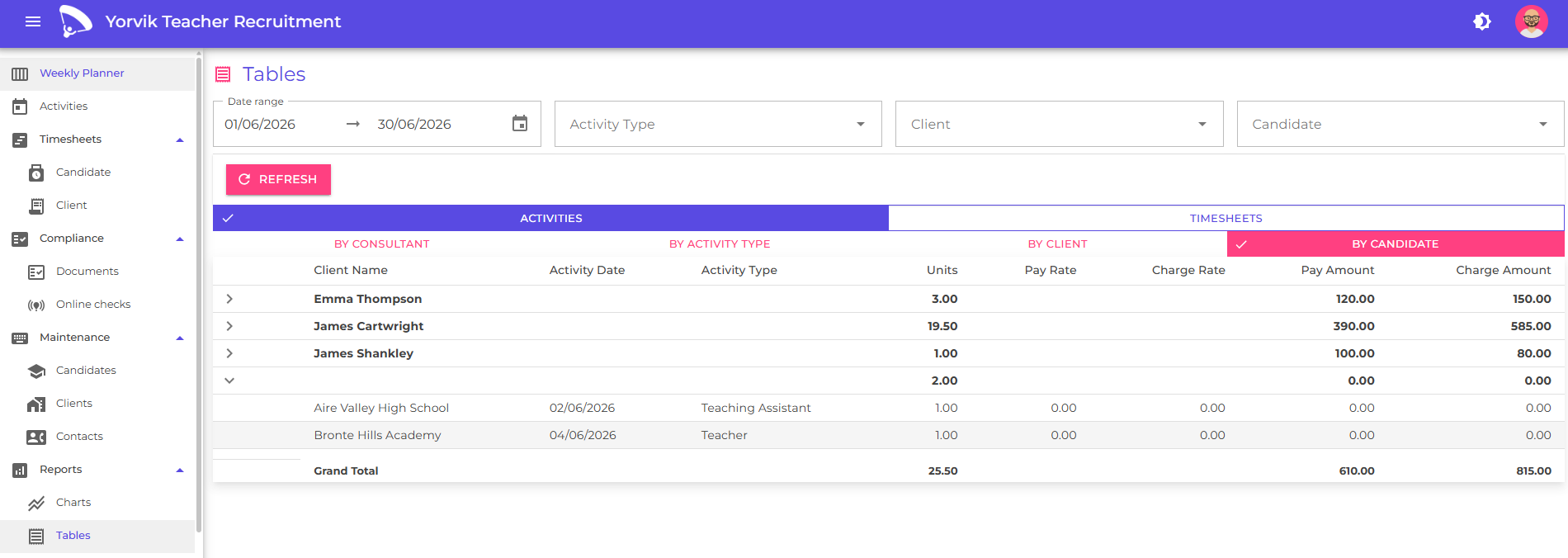
Each table can be filtered to focus on a specific subset of data. Available filters include:
- Activity type
- Client
- Candidate
- Date range
You can also group the results to analyse data from different perspectives. Available grouping options include:
- Consultant
- Activity type
- Client
- Candidate
Grouping allows you to quickly answer questions such as:
- Which consultant has arranged the most bookings?
- Which clients are generating the most activity?
- Which candidates have completed the most work?
- Which activity types are most frequently booked?
Activity reporting
Activity reports allow you to analyse planned and completed work across your agency. These reports can help you understand:
- Booking volumes
- Activity distribution across clients
- Candidate utilisation
- Consultant performance
By applying filters and grouping options, you can quickly identify trends and compare performance across different areas of the business.
Timesheet reporting
Timesheet reports provide visibility into work that has been completed and submitted for approval. These reports can be used to:
- Monitor approved and outstanding timesheets
- Review hours worked
- Analyse activity levels over time
- Identify missing approvals
Because timesheets represent completed work, they are often used as the basis for operational and financial reporting.
Using filters
Filters allow you to narrow report results to the information that is most relevant to you. For example, you may wish to:
- View activity for a specific client
- Analyse a single consultant’s performance
- Review bookings for a particular activity type
- Examine a candidate’s work history
Multiple filters can be combined to produce more focused results.
Best practice
When reviewing performance, it is often useful to:
- Start with a broad view of activity across the business.
- Apply filters to focus on a specific consultant, client, or activity type.
- Group results to identify trends and compare performance.
- Review timesheet data alongside activity data to gain a more complete picture of operational performance.
Regular reporting can help ensure that opportunities, trends, and potential issues are identified early.
Next
Learn how to onboard and manage candidates
Learn how to onboard and manage clients
Learn how to manage and ensure candidate compliance
Learn how to schedule activities
Learn how to generate and send booking forms
Learn how to generate timesheets
Learn how to manage contacts